Performance crime: config to kill performance

Would you as a developer allow a setting that can make system 15 550 times slower?

I’ve received a few memory dumps with high CPU; each scavenges AccessResultCache:

How big is the cache so that every snapshot contains the operation?

Detecting cache size from the snapshot

A ClrMD code snippet locates objects in Sitecore.Caching.Generics.Cache namespace with cache-specific fields & showing only filled caches:

            using (DataTarget dataTarget = DataTarget.LoadCrashDump(snapshot))
            {
                ClrInfo runtimeInfo = dataTarget.ClrVersions[0];
                ClrRuntime runtime = runtimeInfo.CreateRuntime();
                var heap = runtime.Heap;
                var stats = from o in heap.EnumerateObjects()
                            let t = heap.GetObjectType(o)
                            where t != null && t.Name.StartsWith("Sitecore.Caching.Generics.Cache")
                            let box = t.GetFieldByName("box")
                            where box != null
                            let name = o.GetStringField("name")
                            let maxSize = o.GetField<long>("maxSize")
                            let actualBox = o.GetObjectField("box")
                            let currentSize = actualBox.GetField<long>("currentSize")
                            where maxSize > 0
                            where currentSize > 0
                            let ratio = Math.Round(100 * ((double)currentSize / maxSize), 2)
                            where ratio > 40
                            orderby ratio descending, currentSize descending
                            select new
                            {
                                name,
                                address = o.Address.ToString("X"),
                                currentSize = MainUtil.FormatSize(currentSize, false),
                                maxSize = MainUtil.FormatSize(maxSize, false),
                                ratio
                            };

                foreach (var stat in stats)
                {
                    Console.WriteLine(stat);
                }
            }

There are 5 caches that are running out of space, and AccessResultCache is one of them with 282MB running size vs 300 MB allowed:

AccessResultCache is over 280MB in size

Fetched runtime Sitecore config from snapshot proves 300 MB max size:

<setting name="Caching.AccessResultCacheSize" value="300MB"/>

Configuration to control cleanup logic

The Caching.CacheKeyIndexingEnabled.AccessResultCache setting controls how cache is scavenged:

Using indexed storage for cache keys can in certain scenarios significantly reduce the time it takes to perform partial cache clearing of the AccessResultCache. This setting is useful on large solutions where the size of this cache is very large and where partial cache clearing causes a measurable overhead.

Sitecore.Caching.AccessResultCache.IndexedCacheKeyContainer is plugged in should cache key indexing be enabled. The index is updated whenever element is added so that all elements belonging to an item can be easily located. A bit higher price for adding an element in exchange of a faster scavenge.

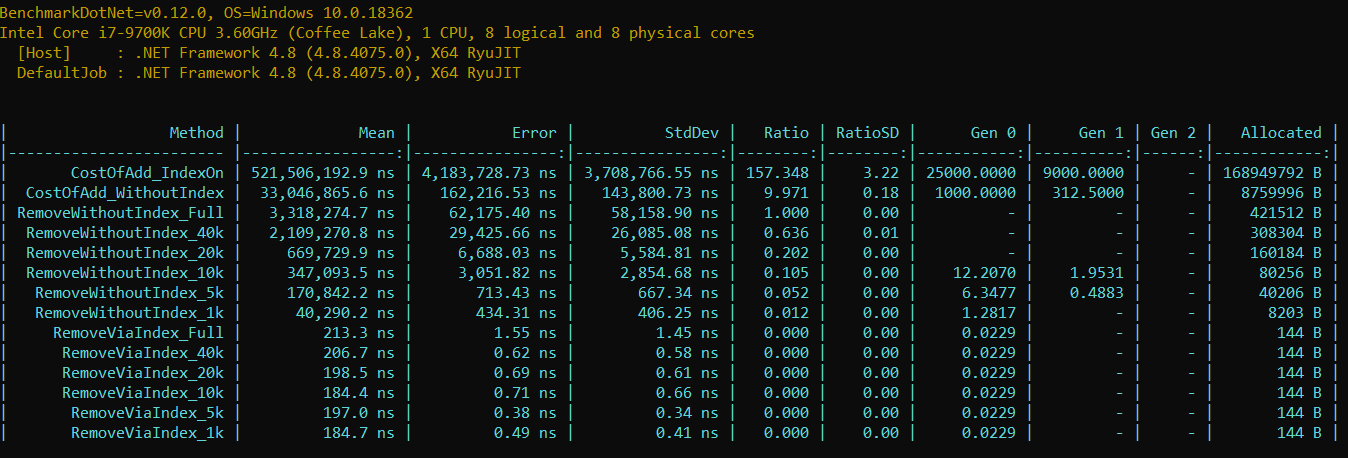
What is performance with different setting values?

We’ll do a series of Benchmark.NET runs to cover the scenario:

  1. Extract all in memory AccessResultCacheKeys (reuse code snipped from How much faster can it be)
  2. Mimic AccessResultCache inner store & load keys into it
  3. Trigger logic to remove element with & without index
  4. Measure how fast elements are added with & without index
  5. Measure speed for different sizes

Load keys into AccessResultCache inner storage

Default storage is ConcurrentDictionary; cleanup is a predicate for every cache key:

        private readonly ConcurrentDictionary<FasterAccessResultCacheKey, string> fullCache = new ConcurrentDictionary<FasterAccessResultCacheKey, string>();
        private readonly IndexedCacheKeyContainer fullIndex = new IndexedCacheKeyContainer();

        public AccessResultCacheCleanup()
        {
            foreach (var key in keys)
            {
                        cache.TryAdd(key, key.EntityId);
                        index.UpdateIndexes(key);
            }            
        }

        private void StockRemove(ConcurrentDictionary<FasterAccessResultCacheKey, string> cache)
        {
            var keys = cache.Keys;
            var toRemove = new List<FasterAccessResultCacheKey>();
            foreach (var key in keys)
            {
                if (key.EntityId == keyToRemove)
                {
                    toRemove.Add(key);
                }
            }

            foreach (var key in toRemove)
            {
                fullCache.TryRemove(key, out _);
            }
        }

        public void RemoveViaIndex(ConcurrentDictionary<FasterAccessResultCacheKey, string> cache, IndexedCacheKeyContainer index)
        {
            var key = new FasterAccessResultCacheKey(null, null, null, keyToRemove, null, true, AccountType.Unknown, PropagationType.Unknown);

            var keys = index.GetKeysByPartialKey(key);

            foreach (var toRemove in keys)
            {
                cache.TryRemove(toRemove, out _);
            }

            index.RemoveKeysByPartialKey(key);
        }

Measuring add performance

Index maintenance needs additional efforts, hence add speed should be also tested:

        [Benchmark]
        public void CostOfAdd_IndexOn()
        {
            var cache = new ConcurrentDictionary<FasterAccessResultCacheKey, string>();            
            var index = new IndexedCacheKeyContainer();
            long size = 0;
            foreach (var key in Keys)
            {
                index.UpdateIndexes(key);
                size += key.GetDataLength();
            }            
        }

        [Benchmark]
        public void CostOfAdd_WithoutIndex()
        {           
            var cache = new ConcurrentDictionary<FasterAccessResultCacheKey, string>();
            long size = 0;
            foreach (var key in Keys)
            {
                cache.TryAdd(key, key.EntityId);
                size += key.GetDataLength();                
            }
        }

Taking into account different cache sizes

Configured 300 MB is 7 .5 times larger than default cache value (40 MB in 9.3), it makes sense to measure timings for different key count as well (58190 keys = 282 MB):

Stock configuration fits somewhere near ~8.4K entries

Understanding the results

  1. Removing element without index takes 15 550 times more
  2. An attempt to remove element costs ~400 KB memory pressure
  3. It takes 3.8 ms for a single removal on IDLE system with 4.8 GHz super CPU
    • Prod solution in cloud (constant cache hits) shall take ~4 times more
  4. Up to 8.4K entries can squeeze into OOB AccessResultCache size
    • OOB Sitecore has ~6K items in master database
    • ~25.4K items live in OOB core database
    • Each user has own access entries
  5. Adding an element into cache with index costs 15 times more

Conclusions

AccessResultCache is aimed to avoid repeatable CPU-intensive operations. Unfortunately, default cache size is too small so that limited number of entries can be stored at once (even less than items in master & web OOB databases). The insufficient cache size flags even on development machine:

However, defining production-ready size leads to ~15540 times higher performance penalties during cache scavenge for OOB configuration = potential for a random lag.

A single configuration change (enable cache key indexing) changes the situation drastically & brings up a few rhetorical questions:

  1. Is there any reason for AccessResultCache to be scavenged even if security field was not modified? To me – no.
  2. Any use-case to disable cache indexing in production system with large cache?
  3. What is the purpose of the switch that slows system 15.5K times?
  4. Should a system pick different strategy based on predefined size & server role?

Summary

  1. Stock Caching.AccessResultCacheSize value is too little for production, increase it at least 5 times (so that scavenge messages no longer seen in logs)
  2. Enable Caching.CacheKeyIndexingEnabled.AccessResultCache to avoid useless performance penalties during scavenge

Performance crime: no respect for mainstream flow

I’ll ask you to add ~30K useless hashtable lookups for each request in your application. Even if 40 requests are running concurrently (30 * 40 = 1.2M), the performance price would not be visible to a naked eye on modern servers.

Would that argument convince you to waste power you pay for? I hope not.

Why could that happen in real life?

The one we look at today – lack of respect to code mainstream execution path.

A pure function with single argument is called almost all the time with the same value. It looks as an obvious candidate to have the result cached. To make the story a bit more intriguing – cache is already in place.

Sitecore.Security.AccessControl.AccessRight ships a set of well-known access rights (f.e. ItemRead, ItemWrite). The right is built from name via a set of ‘proxy‘ classes:

  • AccessControl.AccessRightManager – legacy static manager called first
  • Abstractions.BaseAccessRightManager – call is redirected to the abstraction
  • AccessRightProvider – locates access right by name

ConfigAccessRightProvider is the default implementation of AccessRightProvider with Hashtable (name -> AccessRight) storing all known access rights mentioned in Sitecore.config:

  <accessRights defaultProvider="config">
    <providers>
      <clear />
      <add name="config" type="Sitecore.Security.AccessControl.ConfigAccessRightProvider, Sitecore.Kernel" configRoot="accessRights" />
    </providers>
    <rights defaultType="Sitecore.Security.AccessControl.AccessRight, Sitecore.Kernel">
      <add name="field:read" comment="Read right for fields." title="Field Read" />
      <add name="field:write" comment="Write right for fields." title="Field Write" modifiesData="true" />
      <add name="item:read" comment="Read right for items." title="Read" />

Since CD servers never modify items on their own, rules that modify data are rarely touched. So that a major pile of hashtable lookups inside AccessRightProvider likely targets *:read rules.

Assumption: CD servers have dominant read workload

The assumption can be verified by building the statistics for accessRightName requests:

    public class ConfigAccessRightProviderEx : ConfigAccessRightProvider
    {
        private readonly ConcurrentDictionary<string, int> _byName = new ConcurrentDictionary<string, int>();
        private int hits;
        public override AccessRight GetAccessRight(string accessRightName)
        {
            _byName.AddOrUpdate(accessRightName, s => 1, (s, i) => ++i);
            Interlocked.Increment(ref hits);

            return base.GetAccessRight(accessRightName);
        }
    }

90% of calls on Content Delivery role aims item:read as predicted:

item:read gets ~80K calls for startup + ~30K each page request in a local sandbox.

Optimizing for straightforward scenario

Since 9 out of 10 calls would request item:read, we could return the value straightaway without doing a hashtable lookup:

  public class ConfigAccessRightProviderEx : ConfigAccessRightProvider
    {
        public new virtual void RegisterAccessRight(string accessRightName, AccessRight accessRight)
        {
            base.RegisterAccessRight(accessRightName, accessRight);
        }
    }

    public class SingleEntryCacheAccessRightProvider : ConfigAccessRightProviderEx
    {
        private AccessRight _read;
        public override void RegisterAccessRight(string accessRightName, AccessRight accessRight)
        {
            base.RegisterAccessRight(accessRightName, accessRight);

            if (accessRight.Name == "item:read")
            {
                _read = accessRight;
            }
        }

        public override AccessRight GetAccessRight(string accessRightName)
        {
            if (string.Equals(_read.Name, accessRightName, System.StringComparison.Ordinal))
            {
                return _read;
            }

            return base.GetAccessRight(accessRightName);
        }
    }

All the AccessRights known to the system could be copied from Sitecore config; an alternative is to fetch them from the memory snapshot:

        private static void SaveAccessRights()
        {
            using (DataTarget dataTarget = DataTarget.LoadCrashDump(snapshot))
            {
                ClrInfo runtimeInfo = dataTarget.ClrVersions[0];
                ClrRuntime runtime = runtimeInfo.CreateRuntime();
                var accessRightType = runtime.Heap.GetTypeByName(typeof(Sitecore.Security.AccessControl.AccessRight).FullName);

                var accessRights = from o in runtime.Heap.EnumerateObjects()
                                   where o.Type?.MetadataToken == accessRightType.MetadataToken

                                   let name = o.GetStringField("_name")
                                   where !string.IsNullOrEmpty(name)
                                   let accessRight = new AccessRight(name)                                   
                                   select accessRight;

                var allKeys = accessRights.ToArray();
                var content = JsonConvert.SerializeObject(allKeys);

                File.WriteAllText(storeTo, content);
            }
        }

        public static AccessRight[] ReadAccessRights()
        {
            var content = File.ReadAllText(storeTo);

            return JsonConvert.DeserializeObject<AccessRight[]>(content);
        }

The test code should simulate similar to real-life workload (90% hits for item:read and 10% to others):

public class AccessRightLocating
{
    private const int N = (70 * 1000) + (40 * 10 * 1000);

    private readonly ConfigAccessRightProviderEx stock = new ConfigAccessRightProviderEx();
    private readonly ConfigAccessRightProviderEx improved = new SingleEntryCacheAccessRightProvider();

    private readonly string[] accessPattern;

    public AccessRightLocating()
    {
        var accessRights = Program.ReadAccessRights();
        string otherAccessRightName = null;
        string readAccessRightName = null;
        foreach (var accessRight in accessRights)
        {
            stock.RegisterAccessRight(accessRight.Name, accessRight);
            improved.RegisterAccessRight(accessRight.Name, accessRight);

            if (readAccessRightName is null && accessRight.Name == "item:read")
            {
                readAccessRightName = accessRight.Name;
            }
            else if (otherAccessRightName is null && accessRight.Name == "item:write")
            {
                otherAccessRightName = accessRight.Name;
            }
        }

        accessPattern = Enumerable
            .Repeat(readAccessRightName, count: 6)
            .Concat(new[] { otherAccessRightName })
            .Concat(Enumerable.Repeat(readAccessRightName, count: 3))
            .ToArray();
    }

    [Benchmark(Baseline = true)]
    public void Stock()
    {
        for (int i = 0; i < N; i++)
        {
            var toRead = accessPattern[i % accessPattern.Length];
            var restored = stock.GetAccessRight(toRead);
        }
    }

    [Benchmark]
    public void Improved()
    {
        for (int i = 0; i < N; i++)
        {
            var toRead = accessPattern[i % accessPattern.Length];
            var restored = improved.GetAccessRight(toRead);
        }
    }
}

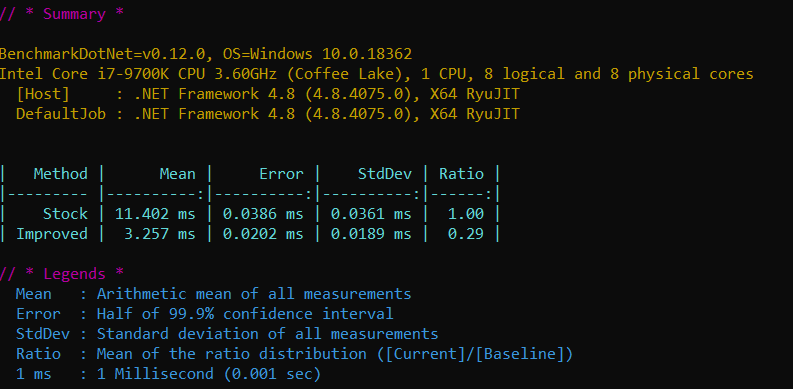
Benchmark.NET test proves the assumption with astonishing results – over 3x speedup:

Conclusion

The performance was improved over 3.4 times by bringing respect for the mainstream scenarioitem:read operation. Being a minor win on a single-operation scale, it gets noticeable as number of invocations grows.

Performance crime: wrong size detection

The amount of memory cache can use is defined in config:

    <!--  ACCESS RESULT CACHE SIZE
            Determines the size of the access result cache.
            Specify the value in bytes or append the value with KB, MB or GB
            A value of 0 (zero) disables the cache.
      -->
    <setting name="Caching.AccessResultCacheSize" value="10MB" />

That is needed to protect against disk thrashing – running out of physical RAM so that disk is used to power virtual memory (terribly slow). That is a big hazard in Azure WebApps – much less RAM compared to old-school big boxes.

Sitecore keeps track of all the space dedicated to caches:

The last ‘Cache created’ message in logs for 9.3

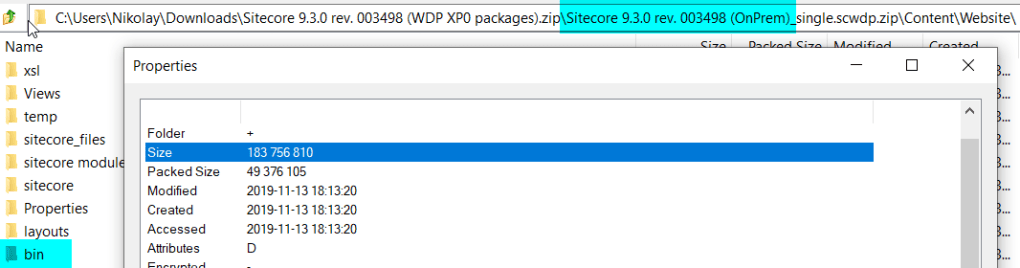
The last entry highlights 3.4 GB is reserved for Sitecore 9.3 OOB caching layer. Neither native ASP.NET cache, nor ongoing activities, nor the assemblies to load into memory are taken into the account (that is a lot – bin folder is massive):

Over 170 MB solely for compiled assemblies

3.4 GB + 170 MB + ASP.NET caching + ongoing activities + (~2MB/Thread * 50 threads) + buffers + …. = feels to be more than 3.5 GB RAM that S2 tier gives. Nevertheless, S2 is claimed to be supported by Sitecore. How come stock cache configuration can consume all RAM and still be supported?

The first solution that comes to the head – cache detection oversizes objects to be on the safe side; whereas actual sizes are smaller. Let’s compare actual size with estimated.

How does Sitecore know the data size it adds to cache?

There are generally 2 approaches:

  • FAST: let developer decide
  • SLOW: use reflection to build full object graph -> calc primitive type sizes

Making class to be either Sitecore.Caching.Interfaces.ISizeTrackable (immutable) or Sitecore.Caching.ICacheable (mutable) allows developer to detect object size by hand, but how accurate could that be?

Action plan

  • Restore some cacheable object from memory snapshot
  • Let OOB logic decide the size
  • Measure size by hand (from the memory snapshot)
  • Compare results

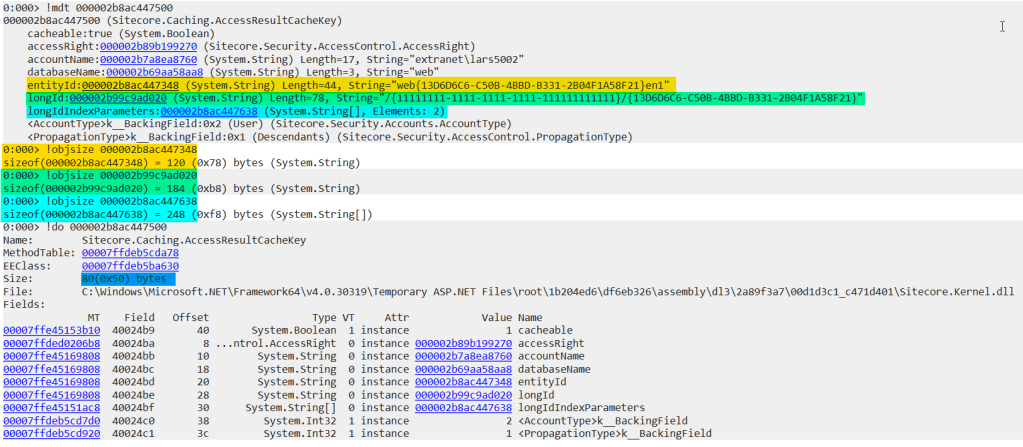
The restored object from snapshot is evaluated to be 313 bytes:

While calculating by-hand shows different results:

Actual size is at least two times larger (632 = (120 + 184 + 248 + 80)) even without:

  • DatabaseName – belongs to database that is cached inside factory;
  • Account name – one account (string) can touch hundreds of items in one go;
  • AccessRight – a dictionary with fixed well-known rights (inside Sitecore.Security.AccessControl.AccessRightProvider);

In this case measurement error is over 100% (313 VS 632). In case the same accuracy of measurements persists for other caches, the system could easily spent double configured 3.4 GB -> ~ 6.8 GB.

Remark: 7 GB is the maximum RAM non-premium Azure Web App plans provide.

Summary

Despite caches are configured to strict limits, system could start consuming more RAM than machine physically has causing severe performance degradation. Luckily, memory snapshots would indicate the offending types in heap and help narrow-down the cause.

Sitecore Fast Queries: second life

Sitecore Fast Query mechanism allows fetching items via direct SQL queries:

	var query = $"fast://*[@@id = {ContainerItemId}]//*[@@id = {childId}]//ancestor::*[@@templateid = {base.TemplateId}]";
	Item[] source = ItemDb.SelectItems(query);
...

fast:// query would be interpreted into SQL fetching results directly from database. Unfortunately, the mechanism is no longer widely used these days. Is there any way to bring it back to life?

Drawback from main power: Direct SQL query

Relational databases are not good at scaling, thereby a limited number of concurrent queries is possible. The more queries are executed at a time, the slower it gets. Adding additional physical database server for extra publishing target complicates solution and increases the cost.

Drawback: Fast Query SQL may be huge

The resulting SQL statement can be expensive for database engine to execute. The translator would usually produce a query with tons of joins. Should item axes (f.e. .// descendants syntax) be included, the price tag raises even further.

Fast Query performance drops as volume of data in database increases. Being ok-ish with little content during development phase could turn into a big trouble in a year.

Alternative: Content Search

Content Search is a first thing to replace fast queries in theory; there are limitations, though:

Alternative: Sitecore Queries and Item API

Both Sitecore Queries and Item APIs are executed inside application layer = slow.

Firstly, inspecting items is time consumable and the needed one might not be even in results.

Secondly, caches are getting polluted with data flowing during query processing; useful bit might be kicked out from cache when maxSize is reached and scavenge starts.
Making Fast Queries great again!

Fast queries can be first-class API once performance problems are resolved. Could the volume of queries sent to database be reduced?

Why no cache for fast: query results?

Since data in publishing target (f.e.web) can be modified only by publishing, queries shall return same results in between. The results can be cached in memory and scavenged whenever publish:end occurs.

Implementation

We’ll create ReuseFastQueryResultsDatabase decorator on top of stock Sitecore database with caching layer for SelectItems API:

    public sealed class ReuseFastQueryResultsDatabase : Database
    {
        private readonly Database _database;

        private readonly ConcurrentDictionary<string, IReadOnlyCollection<Item>> _multipleItems = new ConcurrentDictionary<string, IReadOnlyCollection<Item>>(StringComparer.OrdinalIgnoreCase);
        private readonly LockSet _multipleItemsLock = new LockSet();

        public ReuseFastQueryResultsDatabase(Database database)
        {
            Assert.ArgumentNotNull(database, nameof(database));
            _database = database;
        }

        public bool CacheFastQueryResults { get; private set; }

        #region Useful code
        public override Item[] SelectItems(string query)
        {
            if (!CacheFastQueryResults || !IsFast(query))
            {
                return _database.SelectItems(query);
            }

            if (!_multipleItems.TryGetValue(query, out var cached))
            {
                lock (_multipleItemsLock.GetLock(query))
                {
                    if (!_multipleItems.TryGetValue(query, out cached))
                    {
                        using (new SecurityDisabler())
                        {
                            cached = _database.SelectItems(query);
                        }

                        _multipleItems.TryAdd(query, cached);
                    }
                }
            }

            var results = from item in cached ?? Array.Empty<Item>()
                          where item.Access.CanRead()
                          select new Item(item.ID, item.InnerData, this);

            return results.ToArray();
        }

        private static bool IsFast(string query) => query?.StartsWith("fast:/") == true;

        protected override void OnConstructed(XmlNode configuration)
        {
            if (!CacheFastQueryResults)
            {
                return;
            }

            Event.Subscribe("publish:end", PublishEnd);
            Event.Subscribe("publish:end:remote", PublishEnd);
        }

        private void PublishEnd(object sender, EventArgs e)
        {
            _singleItems.Clear();
        }

A decorated database shall execute the query in case there has been no data in cache yet. A copy of the cached data is returned to a caller to avoid cache data corruption.

The decorator is placed into own fastQueryDatabases configuration node and referencing default database as constructor argument:

<configuration xmlns:patch="http://www.sitecore.net/xmlconfig/" xmlns:role="http://www.sitecore.net/xmlconfig/role/">
  <sitecore role:require="Standalone">
    <services>
      <configurator type="SecondLife.For.FastQueries.DependencyInjection.CustomFactoryRegistration, SecondLife.For.FastQueries"/>      
    </services>
    <fastQueryDatabases>
      <database id="web" singleInstance="true" type="SecondLife.For.FastQueries.ReuseFastQueryResultsDatabase, SecondLife.For.FastQueries" >
        <param ref="databases/database[@id='$(id)']" />
        <CacheFastQueryResults>true</CacheFastQueryResults>
      </database>
    </fastQueryDatabases>
  </sitecore>
</configuration>

Only thing left is to initialize database from fastQueryDatabases node whenever a database request arrives (via replacing stock factory implementation):

    public sealed class DefaultFactoryForCacheableFastQuery : DefaultFactory
    {
        private static readonly char[] ForbiddenChars = "[\\\"*^';&></=]".ToCharArray();
        private readonly ConcurrentDictionary<string, Database> _databases;

        public DefaultFactoryForCacheableFastQuery(BaseComparerFactory comparerFactory, IServiceProvider serviceProvider)
            : base(comparerFactory, serviceProvider)
        {
            _databases = new ConcurrentDictionary<string, Database>(StringComparer.OrdinalIgnoreCase);
        }

        public override Database GetDatabase(string name, bool assert)
        {
            Assert.ArgumentNotNull(name, nameof(name));

            if (name.IndexOfAny(ForbiddenChars) >= 0)
            {
                Assert.IsFalse(assert, nameof(assert));
                return null;
            }

            var database = _databases.GetOrAdd(name, dbName =>
            {
                var configPath = "fastQueryDatabases/database[@id='" + dbName + "']";
                if (CreateObject(configPath, assert: false) is Database result)
                {
                    return result;
                }

                return base.GetDatabase(dbName, assert: false);
            });

            if (assert && database == null)
            {
                throw new InvalidOperationException($"Could not create database: {name}");
            }

            return database;
        }
    }

Outcome

Direct SQL queries are no longer bombarding database engine making fast queries eligible to play leading roles even in highly loaded solutions.

Warning: Publishing Service does NOT support Fast Queries OOB

Publishing Service does not update tables vital for Fast Queries in evil manner: it does not change platform stock configuration leaving a broken promise behind: <setting name="FastQueryDescendantsDisabled" value="false" />

The platform code expects Descendants to be updated so that Fast Queries are executed. Due to table being out-of-date, wrong results are returned.

Performance crime: careless allocations

I was investigating Sitecore Aggregation case a time back and my attention was caught by GC Heap Allocation mentioning RequiresValidator in top 10:

RequiresValidator in TOP allocated types

Combining all generic entries together leads to over 7% of total allocations making it second most expensive type application wide!

  • Yes, all it does is check object is not null
  • Yes, it can be replaced by if (obj is null) throw NOT doing any allocations
  • Yes, it is initialized more than any other Sitecore class
  • Yes, it costs half of application-wide string allocations

What are the birth patterns?

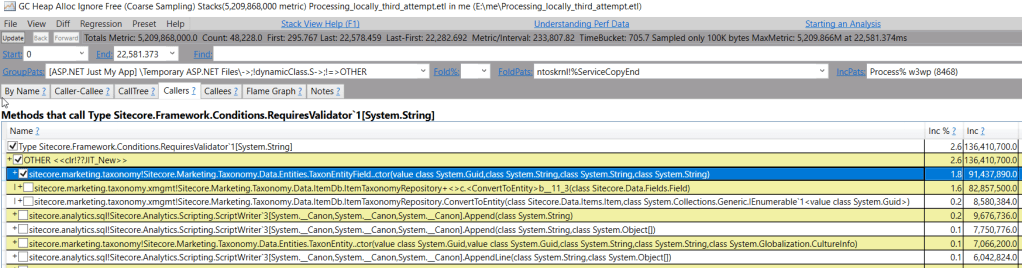
Locating constructor usages via iLSpy does not help as the class referenced everywhere. Luckily, PerfView can show the birth call stacks:

TaxonEntityField main culprit for string validator
Same culprit for Guid validator

The Sitecore.Marketing.Taxonomy.Data.Entities.TaxonEntityField is a main parent. We’ve seen from past articles that memory allocations can become costly, but how costly are they here?

Benchmark time

The action plan is to create N objects (so that allocations are close to PerfView stats), and measure time/memory for stock version VS hand-written one.

Null check still remains via extension method:

        public static Guid Required(this Guid guid)
        {
            if (guid == Guid.Empty) throw new Exception();

            return guid;
        }

        public static T Required<T>(this T value) where T : class
        {
            if (value is null) throw new Exception();

            return value;
        }

Benchmark.NET performance test code simply creates a number of objects:

    [MemoryDiagnoser]
    public class TestMarketingTaxonomies
    {        
        public readonly int N = 1000 * 1000;

        private readonly Guid[] Ids;
        private readonly Guid[] taxonomyId;
        private readonly string[] type;
        private readonly string[] uriPath;
        private readonly CultureInfo[] culture;

        private readonly CultureInfo info;
        private readonly TaxonEntity[] stockTaxons;
        private readonly FasterEntity[] fasterTaxons;        
        public TestMarketingTaxonomies()
        {
            info = Thread.CurrentThread.CurrentCulture;

            stockTaxons = new TaxonEntity[N];
            fasterTaxons = new FasterEntity[N];

            Ids = new Guid[N];
            taxonomyId = new Guid[N];
            type = new string[N];
            uriPath = new string[N];
            culture = new CultureInfo[N];

            for (int i = 0; i < N; i++)
            {
                var guid = Guid.NewGuid();
                var text = guid.ToString("N");
                Ids[i] = guid;
                taxonomyId[i] = guid;
                type[i] = text;
                uriPath[i] = text;
                culture[i] = info;
            }
        }

        [Benchmark]
        public void Stock()
        {                
            for (int i = 0; i < N; i++)
            {
                var taxon = new TaxonEntity(Ids[i], Ids[i], type[i], uriPath[i], info);
                stockTaxons[i] = taxon;
            }
        }

        [Benchmark]
        public void WithoutFrameworkCondtions()
        {            
            for (int i = 0; i < N; i++)
            {
                var taxon = new FasterEntity(Ids[i], Ids[i], type[i], uriPath[i], info);
                fasterTaxons[i] = taxon;
            }
        }
    }

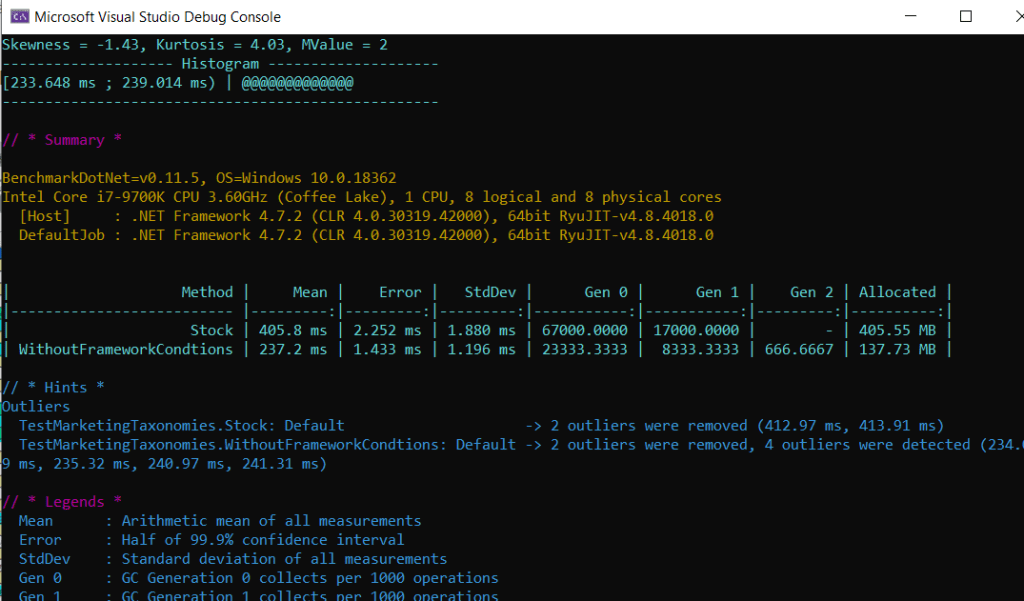
Local Results show immediate improvement

3 times less memory allocated + two times faster without RequiresValidator:

RequiresValidator bringing in slowness

Think about numbers a bit; it took 400ms. on an idle machine with:

  • High-spec CPU with CPU speed up to 4.9 GHz
  • No other ongoing activities – single thread synthetic test
  • Physical machine – the whole CPU is available

How fast that would be in Azure WebApp?

At least 2 times slower (405 VS 890 ms):

Stock version takes almost 900 ms.

Optimized version remains 2 times faster at least:

Optimized version takes 440ms.

What about heavy loaded WebApp?

It will be slower on a loaded WebApp. Our test does not take into account extra GC effort spent on collecting garbage. Thereby real life impact shall be even greater.

Summary

Tiny WebApp with optimized code produces same results as twice as powerful machine.

Each software block contributes to overall system performance. The slowness can either be solved by scaling hardware, or writing programs that use existing hardware optimal.

How much faster can it be?

Performance Engineering of Software Systems starts with a simple math task to solve.

Optimizations done during lecture make code 53 292 times faster:

Slide 67, final results

How faster can real-life software be without technology changes?

Looking at CPU report top methods – what to optimize

Looking at PerfView profiles to find CPU-intensive from real-life production system:

CPU Stacks report highlight aggregated memory allocations turns to be expensive

It turns out Hashtable lookup is most popular operation with 8% of CPU recorded.

No wonder as whole ASP.NET is build around it – mostly HttpContext.Items. Sitecore takes it to the next level as all Sitecore.Context-specific code is bound to the collection (like context site, user, database…).

The second place is devoted to memory allocations – the new operator. It is a result of a developer myth treating memory allocations as cheap hence empowering them to overuse it here and there. The sum of many small numbers turns into a big number with a second CPU consumer badge.

Concurrent dictionary lookups are half of allocation price on third place. Just think about it for a moment – looking at every cache is twice as fast as volume of allocations performed.

What objects are allocated often?

AccessResultCache is very visible on the view. It is responsible for answering the question – can user read/write/… item or not in fast manner:

Many objects are related to access processing

AccessResultCache is responsible for at least 30% of lookups

Among over 150+ different caches in the Sitecore, only one is responsible for 30% of lookups. That could be either due to very frequent access, or heavy logic in GetHashCode and Equals to locate the value. [Spoiler: In our case both]

One third of overall lookups originated by AccessResultCache

AccessResultCache causes many allocations

Top allocations are related to AccessResultCache

Why does Equals method allocate memory?

It is quite weird to see memory allocations in the cache key Equals that has to be designed to have fast equality check. That is a result of design omission causing boxing:

Since AccountType and PropagationType are enum-based, they have valueType nature. Whereas code attempts to compare them via object.Equals(obj, obj) signature leading to unnecessary boxing (memory allocations). This could have been eliminated by a == b syntax.

Why GetHashCode is CPU-heavy?

It is computed on each call without persisting the result.

What could be improved?

  1. Avoid boxing in AccessResultCacheKey.Equals
  2. Cache AccessResultCacheKey.GetHashCode
  3. Cache AccessRight.GetHashCode

The main question is – how to measure the performance win from improvement?

  • How to test on close-to live data (not dummy)?
  • How to measure accurately the CPU and Memory usage?

Getting the live data from memory snapshot

Since memory snapshot has all the data application operates with, it can be fetched via ClrMD code into a file and used for benchmark:

        private const string snapshot = @"E:\PerfTemp\w3wp_CD_DUMP_2.DMP";
        private const string cacheKeyType = @"Sitecore.Caching.AccessResultCacheKey";
        public const string storeTo = @"E:\PerfTemp\accessResult";

        private static void SaveAccessResltToCache()
        {
            using (DataTarget dataTarget = DataTarget.LoadCrashDump(snapshot))
            {
                ClrInfo runtimeInfo = dataTarget.ClrVersions[0];
                ClrRuntime runtime = runtimeInfo.CreateRuntime();
                var cacheType = runtime.Heap.GetTypeByName(cacheKeyType);

                var caches = from o in runtime.Heap.EnumerateObjects()
                             where o.Type?.MetadataToken == cacheType.MetadataToken
                             let accessRight = GetAccessRight(o)
                             where accessRight != null
                             let accountName = o.GetStringField("accountName")
                             let cacheable = o.GetField<bool>("cacheable")

                             let databaseName = o.GetStringField("databaseName")
                             let entityId = o.GetStringField("entityId")
                             let longId = o.GetStringField("longId")
                             let accountType = o.GetField<int>("<AccountType>k__BackingField")
                             let propagationType = o.GetField<int>("<PropagationType>k__BackingField")

                             select new Tuple<AccessResultCacheKey, string>(
                                 new AccessResultCacheKey(accessRight, accountName, databaseName, entityId, longId) 
                                 {
                                     Cacheable = cacheable,
                                     AccountType = (AccountType)accountType, 
                                     PropagationType = (PropagationType)propagationType
                                 }
                                 , longId);

            var allKeys = caches.ToArray();
            var content = JsonConvert.SerializeObject(allKeys);

            File.WriteAllText(storeTo, content);
        }
        }

        private static AccessRight GetAccessRight(ClrObject source)
        {
            var o = source.GetObjectField("accessRight");
            if (o.IsNull)
            {
                return null;
            }
            var name = o.GetStringField("_name");
            return new AccessRight(name);
        }

The next step is to bake a FasterAccessResultCacheKey that caches hashCode and avoids boxing:

    public bool Equals(FasterAccessResultCacheKey obj)
    {
        if (obj == null) return false;
        if (this == obj) return true;

        if (string.Equals(obj.EntityId, EntityId) && string.Equals(obj.AccountName, AccountName) 
&& obj.AccountType == AccountType && obj.AccessRight == AccessRight)
        {
            return obj.PropagationType == PropagationType;
        }
        return false;
    }

+ Cache AccessRight hashCode

Benchmark.NET Time

    [MemoryDiagnoser]
    public class AccessResultCacheKeyTests
    {
        private const int N = 100 * 1000;

        private readonly FasterAccessResultCacheKey[] OptimizedArray;        
        private readonly ConcurrentDictionary<FasterAccessResultCacheKey, int> OptimizedDictionary = new ConcurrentDictionary<FasterAccessResultCacheKey, int>();

        private readonly Sitecore.Caching.AccessResultCacheKey[] StockArray;
        private readonly ConcurrentDictionary<Sitecore.Caching.AccessResultCacheKey, int> StockDictionary = new ConcurrentDictionary<Sitecore.Caching.AccessResultCacheKey, int>();

        public AccessResultCacheKeyTests()
        {
            var fileData = Program.ReadKeys();
           
            StockArray = fileData.Select(e => e.Item1).ToArray();

            OptimizedArray = (from pair in fileData
                              let a = pair.Item1
                              let longId = pair.Item2
                              select new FasterAccessResultCacheKey(a.AccessRight.Name, a.AccountName, a.DatabaseName, a.EntityId, longId, a.Cacheable, a.AccountType, a.PropagationType))
                              .ToArray();

            for (int i = 0; i < StockArray.Length; i++)
            {
                var elem1 = StockArray[i];
                StockDictionary[elem1] = i;

                var elem2 = OptimizedArray[i];
                OptimizedDictionary[elem2] = i;
            }
        }

        [Benchmark]
        public void StockAccessResultCacheKey()
        {
            for (int i = 0; i < N; i++)
            {
                var safe = i % StockArray.Length;
                var key = StockArray[safe];
                var restored = StockDictionary[key];
                MainUtil.Nop(restored);
            }
        }

        [Benchmark]
        public void OptimizedCacheKey()
        {
            for (int i = 0; i < N; i++)
            {
                var safe = i % OptimizedArray.Length;
                var key = OptimizedArray[safe];
                var restored = OptimizedDictionary[key];
                MainUtil.Nop(restored);
            }
        }
    }

Twice as fast, three times less memory

Summary

It took a few hours to double the AccessResultCache performance.

Where there is a will, there is a way.

Why server-side is slow?

I know 2 ways of answering this question.

One steals time with no results, while another one leads to correct answer.

First: Random guess

  • Slow as caches are too small, we need to increase them
  • Slow as server isn't powerful enough, we need to get a bigger box

Characteristics:

  • Based on past experience (cannot guess something never faced before)
  • Advantage: Does not require any investigation effort
  • Disadvantage: As accurate as shooting in the forest without aiming

Second: Profile code execution flow

The dynamic profiling is like a video of 200 meter sprint showing:

  • How fast each runner is
  • How much time does it take for each runner to finish
  • Are there any obstacles on the way?

Collecting dynamic code profile

PerfView is capable of collecting the data in 2 clicks, so all you need to do is:

  • Download the latest PerfView release, updated quite often
  • Run as admin
  • Click collect & check all the flags
  • Stop in 20 sec

Downloading PerfView

Even though I hope my readers are capable of downloading files from link without help, I would drop an image just in case:

Ensure to download both PerfView and PerfView64 so any bitness could be profiled.

Running the collection

  • Launch PerfView64 as admin user on the server
  • Top menu: Collect -> Collect
  • Check all the flags (Zip & Merge & Thread Time)
  • Click Start collection
  • Click Stop collection in ~20 seconds
How to collect PerfView profiles

Collect 3-4 profiles to cover different application times.

The outcome is flame graph showing the time distribution:

Summary

The only way to figure out how the wall clock time is distributed is to analyze the video showing the operation flow. Everything else is a veiled guessing-game.

WinDBG commands, configuration

How many times the problem you’ve faced was caused by ….. wrong configuration:

  • Environment-specific – TEST/UAT/PROD config is enabled in wrong environment
  • Function-specific configurations wrongly ON/OFF:
271 rows for each Sitecore role

Do you recall the pain of configuration spreadsheet with over 270 configuration files to be adjusted for every logical role for prior Sitecore 9 world?

Over 270 files to be manually changed just to show HTML in browser =\

When to blame config?

Configuration is worth inspecting as soon as you hear:

How to view Sitecore config?

Sitecore configuration file is built during system startup and cached inside

  • Sitecore.Configuration.ConfigReader.config (newer)
  • Sitecore.Configuration.Factory.configuration (old versions):

XmlDocument is NOT stored as plain text, hence should be assembled back into human-readable format somehow.

Kudos to NetExt extension for saving the day:

Loading NetExt into WinDBG

!wxml restores XML:

XML document restored

Only Sitecore configuration node is stored there, while native config parts could be read via !wconfig:

In-memory config parts

Alternative approaches

Showconfig tool

One could use SIM Tool, showconfig to re-build configs from web.config + App_Config copy. Are there any guarantees it uses exactly same algorithm as the Sitecore version you are using does?

Showconfig admin page

Requesting sitecore/admin/showconfig.aspx from live instance – the most trustworthy approach. However CDs have that disabled for security reasons, so not an option.

Support package admin page

Support Package admin page would ask all servers online to generate their configs:

Support Package admin page

Do you pay the performance price for non used features?

Intro

The general assumption is – not using a feature/functionality means no performance price is payed. How far do you agree?

Real life example

Content Testing allows verifying which content option works better. Technically it enables multiple versions of same item being published and injects processor into getItem pipeline to figure out which version to show:

      <group name="itemProvider" groupName="itemProvider">
        <pipelines>
          <getItem>
            <processor type="Sitecore.ContentTesting.Pipelines.ItemProvider.GetItem.GetItemUnderTestProcessor, Sitecore.ContentTesting" />
          </getItem>
        </pipelines>
      </group>

As a result, every GetItem API gets extra logic to be executed. What is the price to pay?

Analysis

The processor seem to roughly do following:

  • Check if result is there
    • yes -> quit
    • no – fetch item via fallback provider
  • If item was found – is context suitable for Content Testing to be executed:
    • Are we outside shell site?
    • Are we seeing site in Normal mode (neither editing, nor preview) ?
    • Are we requesting the specific version, or just latest?

Should all be true, a check for cached version is triggered:

  • String concatenation to get unique item ID
  • Append sc_VersionRedirectionRequestCache_ to highlight domain

As a result, each getItem call shall produce strings (strings example)

Question: How much excessive memory does it cost for a request?

Coding time

IContentTestingFactory.VersionRedirectionRequestCache is responsible for caching and defaults to VersionRedirectionRequestCache implementation.

Thanks to Sitecore being config-driven, stock implementation can be replaced with own:

using Sitecore;
using Sitecore.ContentTesting.Caching;
using Sitecore.ContentTesting.Models;
using Sitecore.Data.Items;
using Sitecore.Reflection;

namespace ContentTesting.Demo
{
    public sealed class TrackingCache : VersionRedirectionRequestCache
    {
        private const string MemorySpent = "mem_spent";
        public TrackingCache() => Increment(TypeUtil.SizeOfObjectInstance);  // self

        public static int? StringsAllocatedFor 
            => Context.Items[MemorySpent] is int total ? (int?) total : null;

        private void Increment(int size)
        {
            if (System.Web.HttpContext.Current is null)
            {
                return;
            }

            if (!(Context.Items[MemorySpent] is int total))
            {
                total = 0;
            }

            total += size;

            Context.Items[MemorySpent] = total;
        }

        protected override string GenerateItemUniqueKey(Item item)
        {
            var value  = base.GenerateItemUniqueKey(item);
            Increment(TypeUtil.SizeOfString(value));
            return value;
        }

        public override string GenerateKey(Item item)
        {
            var value = base.GenerateKey(item);
            Increment(TypeUtil.SizeOfString(value));
            return value;
        }

        public override void Put(string key, VersionRedirect versionRedirect)
        {
            Increment(TypeUtil.SizeOfObjectInstance); // VersionRedirect is an object
            base.Put(key, versionRedirect);
        }
    }
}

The factory implementation:

using Sitecore.ContentTesting;
using Sitecore.ContentTesting.Caching;
using Sitecore.ContentTesting.Models;
using Sitecore.Data.Items;

namespace ContentTesting.Demo
{
    public sealed class DemoContentTestingFactory: ContentTestingFactory
    {
        public override IRequestCache<Item, VersionRedirect> VersionRedirectionRequestCache => new TrackingCache();
    }
}

And the EndRequest processor:

using Sitecore;
using Sitecore.Abstractions;
using Sitecore.Pipelines.HttpRequest;

namespace ContentTesting.Demo
{
    public sealed class HowMuchDidItHurt : HttpRequestProcessor
    {
        private readonly BaseLog _log;

        public HowMuchDidItHurt(BaseLog log) 
            => _log = log;

        private int MinimumToComplain { get; set; } = 10 * 1024; // 10 KB

        public override void Process(HttpRequestArgs args)
        {
            var itHurts = TrackingCache.StringsAllocatedFor;

            if (itHurts is null) return;

            if (itHurts.Value > MinimumToComplain)
            {
                _log.Warn($"[CT] {MainUtil.FormatSize(itHurts.Value, translate: false)} spent during {args.RequestUrl.AbsoluteUri} processing.", this);
            }
        }
    }
}

Log how much memory spent on request processing by CT (sitecore.config):

    <httpRequestEnd>
      <processor type="Sitecore.Pipelines.PreprocessRequest.CheckIgnoreFlag, Sitecore.Kernel" />
      <processor type="ContentTesting.Demo.HowMuchDidItHurt, ContentTesting.Demo" resolve="true"/>
...

Wire up new CT implementation Sitecore.ContentTesting.config that logs memory consumed:

    <contentTesting>
      <!-- Concrete implementation types -->
      <contentTestingFactory type="ContentTesting.Demo.DemoContentTestingFactory, ContentTesting.Demo"/>
      <!-- <contentTestingFactory type="Sitecore.ContentTesting.ContentTestingFactory, Sitecore.ContentTesting" /> -->

Testing time

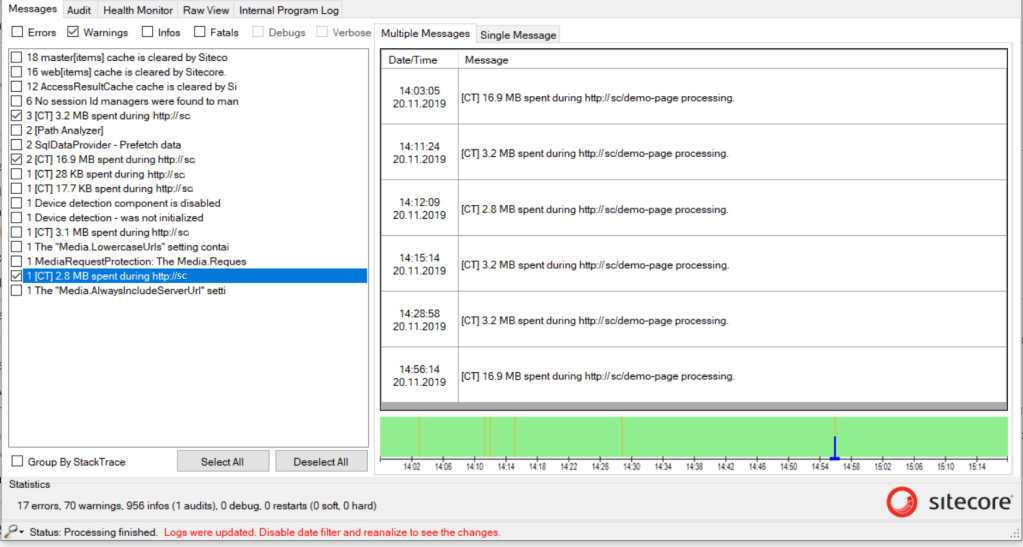
The local results are: 16.9 MB empty VS 3.2 MB warm HTML caches.

50 requests processed at a time would give extra 150 MB pressure, and that is only for a single feature out of many. Each relatively low performance price getting multiplied on number of features results in a big performance price to pay.

A system with 20 same price unused components would waste over 3GB of memory. That does not sound as cheap any more, right?

Conclusion

Even though you might not be using Content Testing (or any other feature), the performance price is still payed. Would you prefer not to pay the price for unused stuff?

Why are reports outdated?

Case study: Analytics reports were a few weeks behind.

Sitecore Reporting introduction

Narrow issue cause down

  • Visitor data is flushed into collection database as number of records increases
  • Interaction live processing pool grows – aggregation is not fast enough

How many visits are pending for aggregation?

The processing pool had over 740K records with oldest entry dated a few weeks ago (same as latest report data).

Throw in more hardware?

Unfortunately, that is the solution the majority decides to take despite:

  • There are no proves existing hardware is used efficiently
  • The current setup is properly configured
  • There are no proves additional hardware would help

Investigation plan

  • Restore prod dbs locally
  • Configure aggregation locally
  • Launch SQL Server profiler for ~60 seconds
  • Launch PerfView for ~30 seconds
  • Collect a few memory snapshots

Collection phase

Triggering aggregation locally with prod dbs killed laptop:

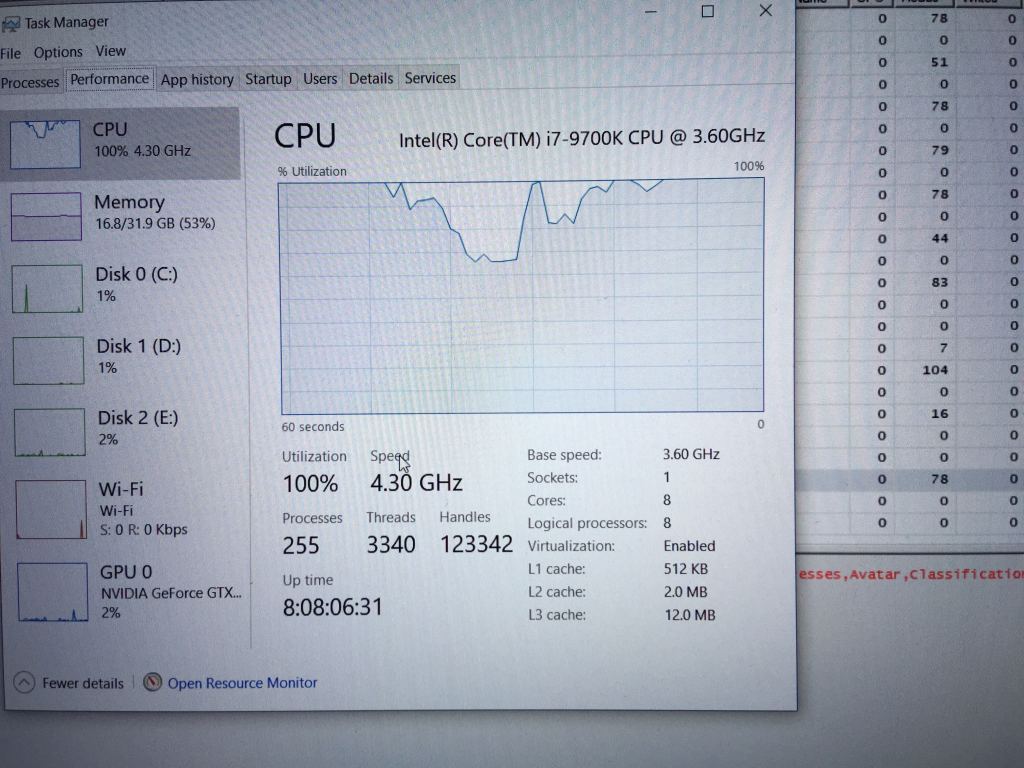
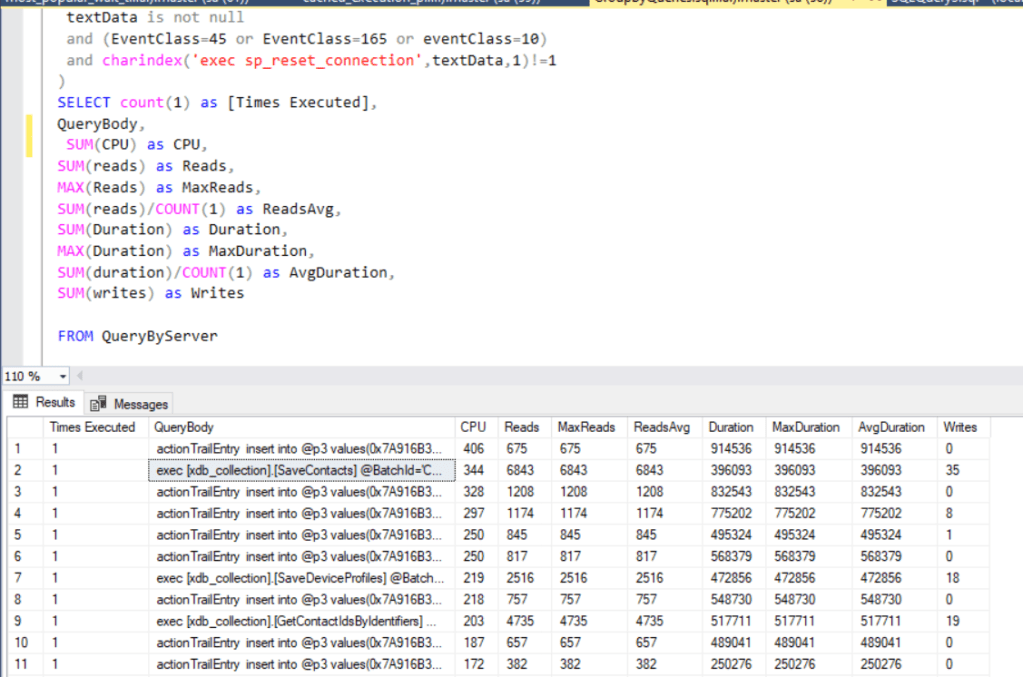
Task manager has shown 80% of CPU usage by SQL Server. Even though queries did not consume much CPU, they had huge duration:

Please tell me where it hurts:

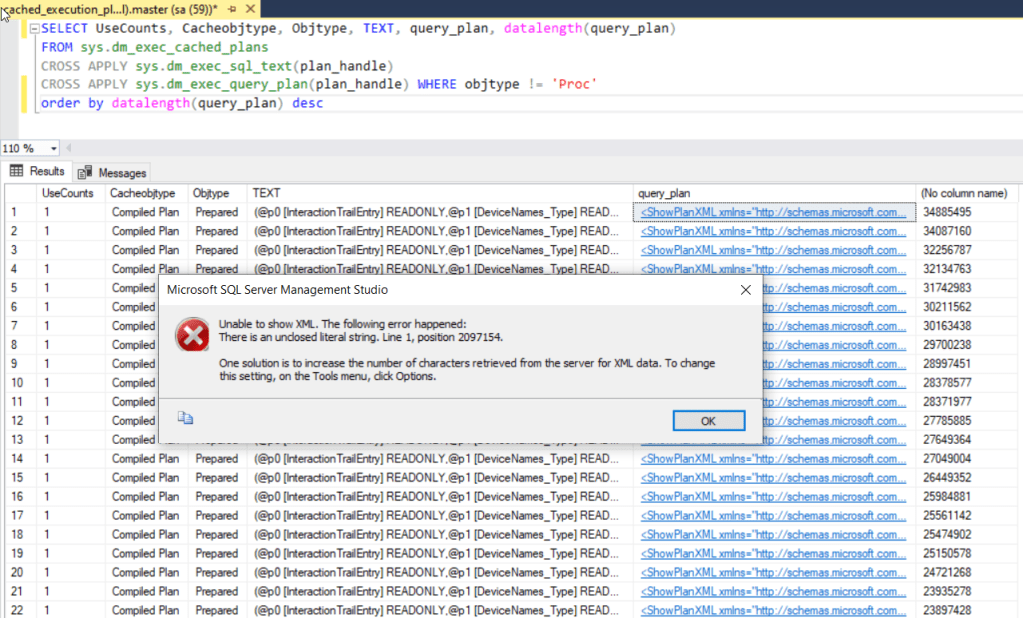
RESOURCE_SEMAPHORE_QUERY_COMPILE is on top of the wait list highlighting query compilations are bottleneck. Good thing we could inspect already compiled plans to get a glimpse of queries:

Ironically, query plan cannot fit default XML output size.

SQL Server needs over 30MB solely for describing how query is to be executed. There are many ‘huge’ queries processed at a time causing compilation gate to hit the limit.

Inspecting memory snapshot

!sqlcmd -s open command gives us a list of all SQL requests:

No wonder MSSQL Server is dying as the first SQL command has 1.7M characters:

The command is run by 58th thread:

It turns out that huge commands are produced by Analytics SQL bulk storage provider. Instead of doing many lightweight SQL calls, it collects them into a batch to avoid network latency cost for each command.

Solution: Stored procedures would reduce the length of SQL query & allow reusing compiled query plans => resolve bottleneck.

Intermediate summary

The behavior was reported to Sitecore:

  • Performance issue 370868 has been registered
  • AD-hoc queries are converted into Stored procedures for by Support
  • Hotfix to increase the aggregation speed has been provided

As a result, aggregation speed increased two times at least.

Even though further improvements are on the deck, I’ll save them for future posts.